Improve CTR From Search Results: 9 levers
7,950 organic clicks/mo came from just 557,000 impressions/mo, which means the page-level problem is not visibility alone. The fix is search snippet optimization, mapped to `Performance › Search results`, `Indexing › Pages`, and `Links › External links`.
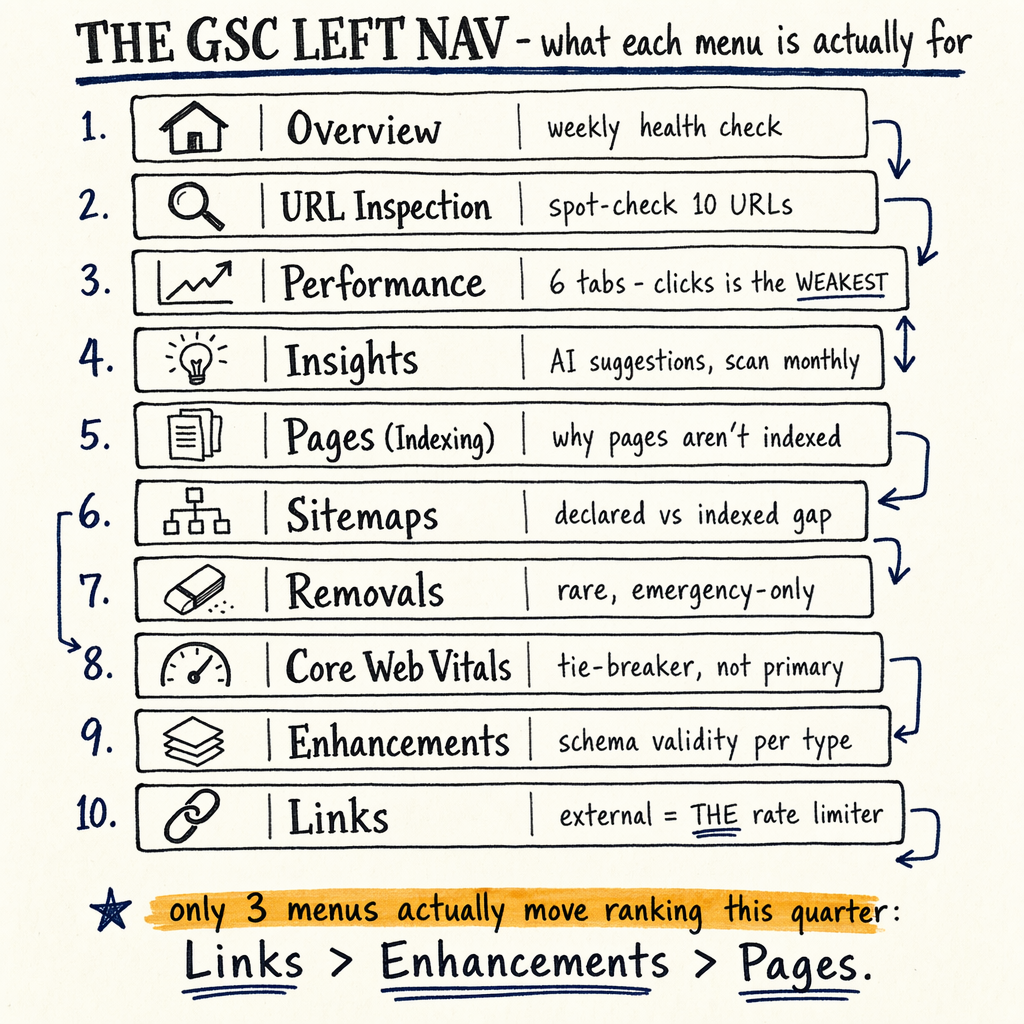
CTR baseline in GSC
The current enzymes.bio baseline is loud: 7,950 organic clicks/mo in May 2026, up from 2,770 in May 2025, with 557,000 impressions/mo, 1.4% sitewide CTR, and avg position 11.8 for May 2026. That is classic “visible but not chosen” traffic.
Use Performance › Search results in sc-domain:example.com and set Last 16 months. Keep Total clicks, Total impressions, Average CTR, and Average position in view. Then segment by query, page, country, and device. CTR fixes only matter where impressions are already there.
The audit also shows 16,100 indexed pages and 591,000 NOT indexed in Indexing › Pages, plus 0 external backlinks in Links › External links. That matters because weak authority lowers both ranking stability and snippet trust. On this site, CTR is a multiplier, but backlinks are the rate-limiter.
Which levers move CTR
Title tag rewrite
Usually the biggest controllable lift. Compare Total clicks before and after changing the primary query term, number, and intent match. See /learn/title-tag-optimization/.
Meta description rewrite
A description rarely creates demand, but it can convert it. Use a specific benefit, proof point, and one CTA. See /learn/meta-description-best-practices/.
Schema markup
Enhancements › Product snippets, Enhancements › Breadcrumbs, and Enhancements › FAQ can change SERP real estate and format. See /learn/schema-markup-types/.
URL structure
Cleaner paths help humans scan the snippet. They also help Google cluster intent. Keep it short, stable, and lowercase.
Favicon and brand
Small asset, real effect. In crowded SERPs, the favicon and brand wording can raise recognition. This is often a free gain.
Rich result eligibility
Rich results do not guarantee a lift, but they can. Watch Enhancements › Breadcrumbs, Enhancements › FAQ, and Enhancements › Product snippets for valid item counts.
Title tags first
- 01
Find high-impression queries
Open
Performance › Search results, then sort byTotal impressions. Target queries with position 4 to 20 and CTR below the page average. These are the easiestboost ctrcandidates. - 02
Match intent before style
If the query is transactional, the title should look transactional. If the query is informational, promise the answer early. This is where
ctr optimizationstarts. - 03
Use one primary term
Put the primary keyword once, near the front if possible. Avoid title stuffing. The snippet needs to read like a clean promise, not a keyword dump.
- 04
Add one differentiator
Use a number, year, format, or proof signal. Example:
Improve CTR From Search Results: 9 levers. That is clearer than a vague label.
Meta descriptions next
Meta descriptions are the second pass because they usually matter most on queries where Google keeps the title but rewrites the rest of the snippet. Treat them as a conversion line, not a ranking factor.
For ctr in gsc, compare pages with similar Average position and different Average CTR. Then inspect the winning descriptions in Performance › Search results by page and query. If one page gets clicks at position 11.8 and another stalls at 12.4, the difference is often the wording, not the ranking.
Use one concrete benefit, one proof element, and one action. Keep it tight enough that Google does not have to truncate the point.
Snippet rewrite template
<title>Improve CTR From Search Results: 9 levers</title>
<meta name="description" content="Improve CTR from search results with 9 levers. See GSC data, title tag fixes, schema, and snippet lifts from 7,950 clicks/mo.">
<link rel="canonical" href="https://example.com/learn/improve-ctr-from-search-results/">
<meta property="og:title" content="Improve CTR From Search Results: 9 levers">
<meta property="og:description" content="GSC-first CTR optimization with exact reports, numbers, and snippet tests.">
<meta name="twitter:card" content="summary_large_image">
Schema and rich results
Schema is useful when it changes the visible result, not when it only makes code look tidy. Check Enhancements › Breadcrumbs, Enhancements › Product snippets, and Enhancements › FAQ for valid pages and error counts.
The strongest practical gains usually come from pages that already have demand in Performance › Search results. If the page has impressions but weak CTR, adding FAQ or breadcrumb markup may create more screen space and a clearer promise. See /services/schema-markup-implementation/ if you want the implementation handled.
Google does not guarantee rich results. But schema can make the snippet easier to parse, and easier to trust. That matters more when you have 35 languages via TranslatePress and a lot of thin indexation noise.
What changes what
| Field | Best for CTR | Why it matters |
|---|---|---|
Title tag | High-impression queries | Usually the largest rewrite lever |
Meta description | Pages with good rank but weak clicks | Converts impressions into clicks |
Schema | Results with eligible enhancements | Can expand SERP space |
URL structure | New or renamed pages | Supports intent clarity |
Favicon/brand | Crowded branded SERPs | Improves scan speed |
Breadcrumbs | Nested sites | Shows hierarchy in snippet |
SERP snippet hygiene
- ✓
Keep the primary keyword in the title once, not three times.
- ✓
Avoid duplicate titles across templates.
- ✓
Remove vague modifiers like “best”, “ultimate”, and “modern” unless they are specific.
- ✓
Check
Indexing › Pagesfor soft 404s, noindex, and duplicate canonical signals. - ✓
Check
Indexing › Sitemapsfor submitted vs indexed gaps. - ✓
Check
Settings › Crawl statsfor crawl spikes that do not correlate with indexed growth. - ✓
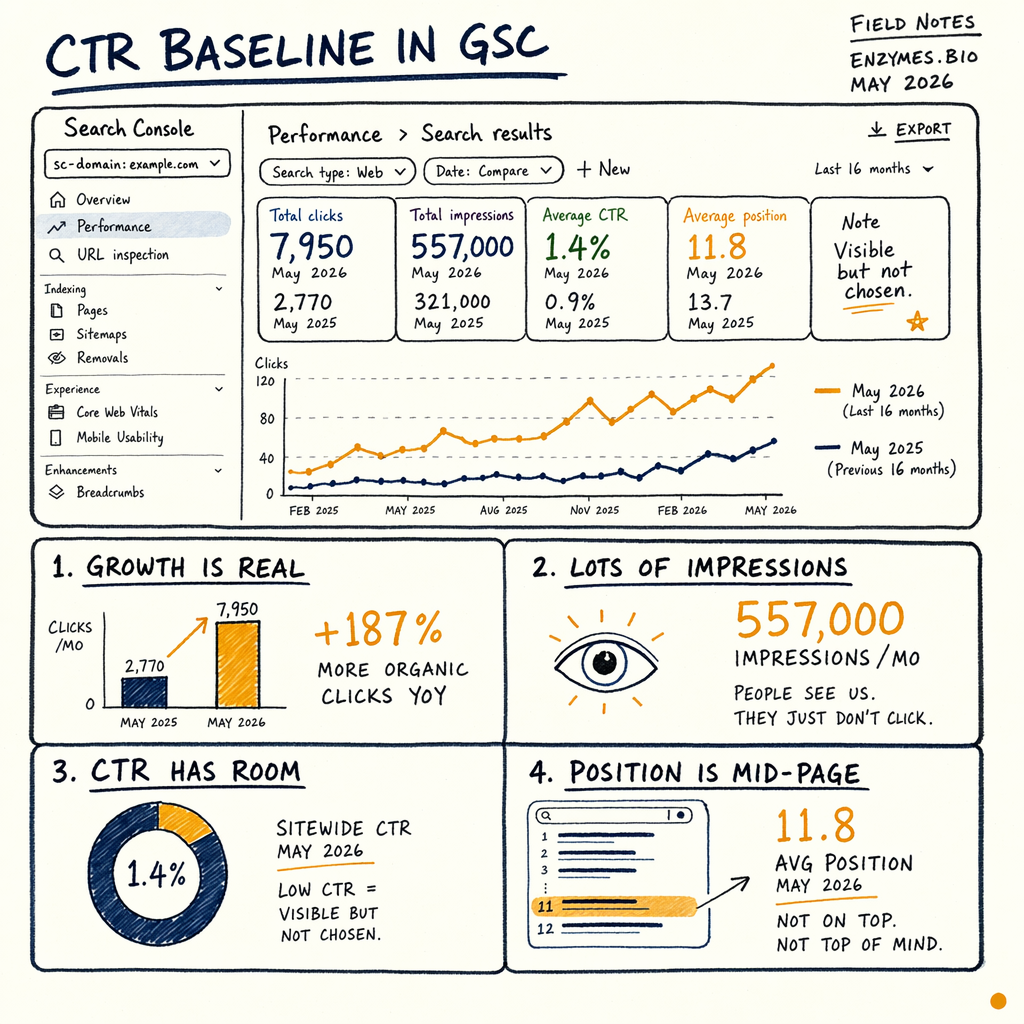
Use one image reference in audits to show GSC navigation, such as
/images/diagram-gsc-leftnav.png. - ✓
If the page is product-led, align
Enhancements › Product snippetswith the actual on-page price and availability.
Measure lift in GSC
CTR work is only real if Total clicks rises faster than Total impressions or Average position changes. Use the same query set before and after the edit. Then compare Average CTR on the exact page group.
A useful pattern is to bucket pages by position. For example, pages around position 11.8 and 12.4 often sit on the edge of page one and page two. A snippet improvement on those pages can move more clicks than a rewrite on a page already winning position 3.
If the page receives impressions but no clicks, inspect whether the result is being beaten by a stronger title, a richer result, or a clearer brand. If the page has 0 external backlinks, the snippet has to do more work to earn the first click.
GSC filter example
{
  "searchType": "web",
  "dimensions": ["query", "page"],
  "dimensionFilterGroups": [
    {
      "filters": [
        {
          "dimension": "page",
          "operator": "contains",
          "expression": "/learn/improve-ctr-from-search-results/"
        }
      ]
    }
  ],
  "rowLimit": 25,
  "startDate": "2025-01-01",
  "endDate": "2026-05-31"
}
FAQ
What GSC report should I start with?
Start in Performance › Search results. Use Total clicks, Total impressions, Average CTR, and Average position. Then isolate queries with high impressions and weak CTR.
Does schema always improve CTR?
No. Schema helps when it changes the visible result or clarifies hierarchy. Check Enhancements › Breadcrumbs, Enhancements › FAQ, and Enhancements › Product snippets for valid outputs before expecting a lift.
What matters more, title tags or meta descriptions?
Usually title tags. Meta descriptions help convert. If the title is off-intent, the description cannot fully fix it.
How do I know if the change worked?
Compare the same queries and pages before and after the edit. Watch Average CTR and Total clicks in Performance › Search results, not just rankings.
What if my site has lots of indexed pages but low CTR?
That usually means the issue is snippet quality, intent mismatch, or weak authority. Enzymes.bio is a good example: 16,100 indexed pages did not prevent a 1.4% CTR.